 AnchorKit
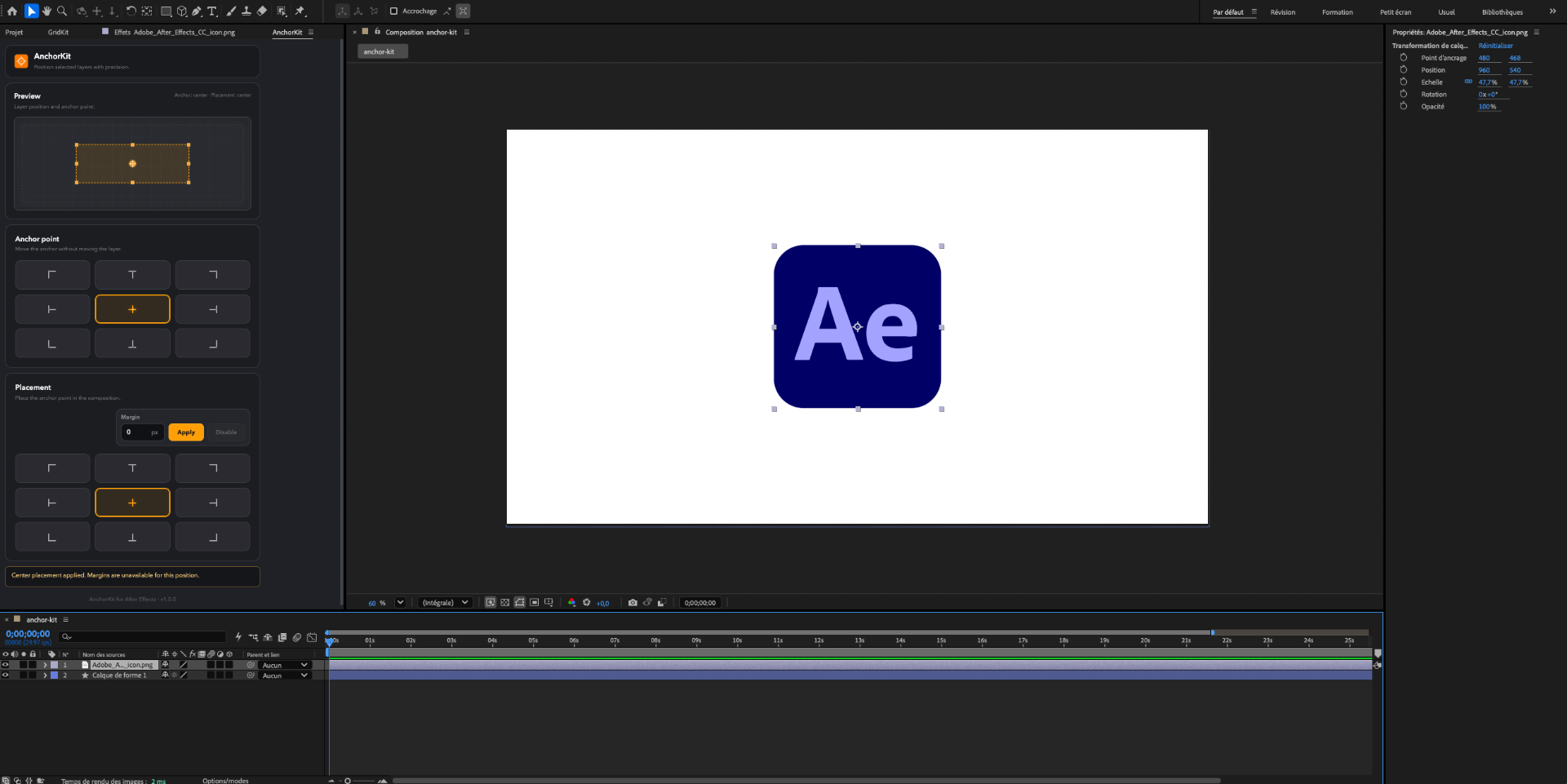
Control anchor points faster inside After Effects. AnchorKit lets you snap the anchor point to any position and align layers on the frame in one click, so your animations start clean and stay perfectly aligned.

Secure payment by Stripe
Why use AnchorKit?
Easy installation in After Effects
Easy installation in After Effects
Install AnchorKit in just a few clicks and start using it directly inside After Effects. The plugin is compatible with After Effects 2020 and later, on both Mac and Windows.
One-click anchor point placement
One-click anchor point placement
Send the anchor point exactly where you need it - center, edges or corners - in a single click. No more dragging it by hand or eyeballing the right spot.
Align layers on the frame
Align layers on the frame
Position any layer against the composition based on its anchor point: top-left, center, bottom-right, or any edge. Snap elements into place instead of tweaking X and Y values by hand.
Add custom margins
Add custom margins
Adjust your layer position with a custom pixel margin. Add spacing from the edges, corners, or center of your composition, then enable or disable the margin depending on your layout needs.
Download AnchorKit
Place anchor points, align your layers on the frame, and keep everything exactly where it should be — all inside After Effects. AnchorKit turns fiddly manual adjustments into one-click actions.
Secure payment by Stripe